Tag Archives: install

Windows 11 installation step by step ⚡Windows 11 New AI Version 2026 Install Now

Video

Video Description

Windows 11 Installation Step by step Here we are going to show you complete installation if you have no knowledge about how to do anything iit will perfect video we are going to install altest 2026 version that comes wiith all Ai Features and Everythings Check out video for more.

Also Do all This at your own Risk Installation of windows is actully a hard task and even can cause problem so must take backup and follow the video properly.
#windows11 #windows #pc

*
Do Anything With Your Computer at Your Own Risk! Take backup Before Taking Major Actions! (We are just able to Help you From Our Tech Website(About page) in any wrong case)
*

Join Channel
=https://www.youtube.com/channel/UC8w2DN9jurGyj5sutscVs-A/join
(For Extra Benefits)

📶More Tech
=https://www.youtube.com/channel/UC-S9sHakkr4LbowghnFADBg

🚀Shorts Channel-Quick Tech Updates
=https://www.youtube.com/@AdixShorts

Linux Lit!
=https://www.youtube.com/@linuxlit

Connect With ME On Other Platforms
🔸InstaGram= https://www.instagram.com/adi17_yt/
🔸FaceBookPage= https://www.facebook.com/Adi4u.in
🔸DisCord= https://discord.gg/qyEDJ3C5QA
🔸Twitter= https://twitter.com/Aditya17yt
🔸LinkedIn= https://www.linkedin.com/in/adi17sa
🔸Threads= https://www.threads.net/@adi17_yt

🌐Check Adi 4 u Official Website For More Upcoming Information and Updates= Adi4u[dot]in

🌐 Facing Tech Problems? Visit adi4uforum[dot]com
(Post Your question Today)

⚙Gears I Use;
🔺Android Device
iPhone 15
=https://amzn.to/3QtW2Q9
Vivo X60(8GB Ram)
=https://amzn.to/3zvP96o

🔺Computer Specs
Main Unit
Processor= https://amzn.to/43zpjh1
SMPS= https://amzn.to/3Xb0IN5
Cabinet= https://amzn.to/3X5YWg0
Ram= https://amzn.to/3NscVJS
Storage
NVME= https://amzn.to/3J9aOIy
Hard Drive= https://amzn.to/3J9BWad
GPU= https://amzn.to/3Pcl0Ur
Motherboard
=b50M PG Sonic
Monitor= https://amzn.to/33nML4k

🔺Other Computers are Experiment or server Bases

🔺Video Gears
Tripod=https://amzn.to/3vfGKBg
-https://amzn.to/3cAHIl5
-https://amzn.to/3zioXfX
Microphone=https://amzn.to/3CKv28p
PC Mic=https://amzn.to/3IJcKbe

🔺Laptop
https://amzn.to/3Q8QjzQ
Chromebook – https://amzn.to/43unEIE

🎥Camera I am using For Recording
Sony Alpha A7C
=https://amzn.to/3UIxNjL
Lens 28MM F2
-Canon 200D Mark ii
=https://amzn.to/3SNjxCz
-Lens 1 18-55 MM
-Lens 2 50MM F/1.8 = https://amzn.to/3SwixTM
For Screen Recording – OBS Studio

❕ Software I Use ;
🎬Currently Using Adobe Premiere Pro For Video Editing!
For Making Thumbnails – Adobe Photoshop
(All Videos u0026 thumbnails are Develop By me)

Purchase Your Goods From Amazon Shop[All my products include]
[Ad Link]
=https://www.amazon.in/shop/adi4u

NOTE: All content used is copyrighted to Adi 4 u,
Use or commercial display or editing of the content without proper
authorization is not allowed…
Thanks For supporting #Adi4u

Windows 10 – Download & Install!⚡ For Free! Stop Using Fake Version – Win 10 Install step by step

Video

Video Description

Windows 10 Download u0026 Install Orignal Version For Free! Without Any Error – Windows 10 Complete Download and Install Process in 2023!

Today we are going to install Windows 10 without any errors if you just build your new pc or want to upgrade your windows from windows 7 or 8 to 10 then this video will help you out

Video Timesteps
00:00 Intro – Windows 10 Installation Requirement and Process
01:21 How to Download u0026 Make Windows 10 Bootable Pendrive
03:35 Windows 10 Installation BIOS Setup!
06:40 Windows 10 First Look!
06:54 Outro u0026 Dual Boot System

*
Do Anything With Your Computer at Your Own Risk! Take backup Before Taking Major Actions! (We are just able to Help you From Our Tech Website(About page) in any wrong case)
*

Join Channel
=https://www.youtube.com/channel/UC8w2DN9jurGyj5sutscVs-A/join
(For Extra Benefits)

📶More Tech
=https://www.youtube.com/channel/UC-S9sHakkr4LbowghnFADBg

🚀Shorts Channel-Quick Tech Updates
=https://www.youtube.com/channel/UCH0t-16pPdySmfUURX2wZfA

Connect With ME On Other Platforms
🔸InstaGram= https://www.instagram.com/adi17_yt/
🔸FaceBookPage= https://www.facebook.com/Adi4u.in
🔸DisCord= https://discord.gg/qyEDJ3C5QA
🔸Twitter= https://twitter.com/Aditya17yt
🔸LinkedIn= https://www.linkedin.com/in/adi17sa

🌐Check Adi 4 u Official Website For More Upcoming Information and Updates= Adi4u[dot]in

⚙Gears I Use;
🔺Android Device
Vivo X60(8GB Ram)
=https://amzn.to/3zvP96o

🔺Computer Specs
Monitor=https://amzn.to/33nML4k
Cabinet (Without Power Supply)= https://amzn.to/35gfdoW
Ryzen 5 3600 = https://amzn.to/2MH81Mx
Rtx 2060 super= https://amzn.to/3pOf8kc
Rtx 3060ti =https://amzn.to/3Zyj0c0
Aorus B450 Elite =https://amzn.to/2MH8bDD
550 Watt supply=https://amzn.to/2XerndF
RAM =https://amzn.to/3olsjJp
Storage -120GB SSD=https://amzn.to/2Lud6qx
-Hard Drive 1TB=https://amzn.to/2Xfv6b9
Keyboard Mouse= https://amzn.to/3pY9VXs
Webcam= https://amzn.to/3x6UYWu

🔺2nd Computer Specs
Ryzen 3 2200G= https://amzn.to/359mc2I
Motherboard= https://amzn.to/3gkR3yk
Ram= https://amzn.to/3iwuERD

🔺Other Computers are Experiment or server Bases

🔺Video Gears
Tripod=https://amzn.to/3vfGKBg
-https://amzn.to/3cAHIl5
-https://amzn.to/3zioXfX
Microphone=https://amzn.to/3CKv28p
PC Mic=https://amzn.to/3IJcKbe

🎥Camera I am using For Recording
-Canon 200D Mark ii
=https://amzn.to/3SNjxCz
-Lens 1 18-55 MM
-Lens 2 50MM F/1.8 = https://amzn.to/3SwixTM
For Screen Recording – OBS Studio

❕ Software I Use ;
🎬Currently Using Adobe Premiere Pro For Video Editing!
For Making Thumbnails – Adobe Photoshop
(All Videos u0026 thumbnails are Develop By me)

Purchase Your Goods From Amazon Shop[All my products includes]
[Ad Link]
=https://www.amazon.in/shop/adi4u

NOTE: All content used is copyrighted to Adi 4 u,
Use or commercial display or editing of the content without proper
authorization is not allowed…
Thanks For supporting #Adi4u

Install & Configure NanoBrowser AI Agent | OpenAI, OpenRouter, Local LLM

Video

Video Description

This video demonstrates how to set up NanoBrowser AI and connect it to multiple LLMs in a single workflow:
1. Direct OpenAI integration with your API key
2. OpenRouter to access DeepSeek, Gemini, and Anthropic Claude using one API
3. A local Dolphin-Mistral model exposed on an OpenAI-compatible endpoint

The goal is a reliable, privacy-aware multi-LLM setup you can switch between for quality, latency, and cost—without changing your browser.

🖥️ What you will learn
1. Install and configure NanoBrowser AI
2. Configure providers: OpenAI, OpenRouter, and a local OpenAI-compatible server
3. Connect multiple LLMs through OpenRouter (DeepSeek, Gemini, Claude)
4. Add a local Dolphin-Mistral model (e.g., via LM Studio or Ollama)
5. Validate each connection with request examples

🔗 Links
1. NanoBrowser: https://nanobrowser.ai/
2. GitHub (NanoBrowser): https://github.com/nanobrowser/nanobrowser
3. OpenAI: https://platform.openai.com/
4. OpenRouter: https://openrouter.ai/

✅ Prerequisites
1. API keys: OPENAI_API_KEY, OPENROUTER_API_KEY
2. A local OpenAI-compatible server running Dolphin-Mistral (e.g., LM Studio or Ollama)
3. Base URLs you will configure in NanoBrowser:
o OpenAI: https://api.openai.com/v1
o OpenRouter: https://openrouter.ai/api/v1
o Local: http://localhost:11434/v1 (adjust for your runtime)

************Never expose API keys on screen. Use environment variables or a secrets manager and revoke/regenerate keys if they’re ever leaked.*******

#NanoBrowser #LLM #OpenAI #OpenRouter #DeepSeek #Gemini #Anthropic #Mistral #AIAgents #WebAutomation #Privacy #DFIR #KisoSecure

If you want, I can tailor this with your brand voice (Kiso Secure), add a pinned comment template, or swap in exact local runner instructions you used.

Windows 11 25H2 ISO File Released! 🤩Download & Install – Biggest Update is Here! ⚡

Video

Video Description

Windows 11 25h2 Released Recently and It's ISO File is Right now even Available Comes with New Features and Setting Today we are going to Overview and Sho you the Easiest Way to install it!!
#windows11 #windows1125h2 #gaming

*
Do Anything With Your Computer at Your Own Risk! Take backup Before Taking Major Actions! (We are just able to Help you From Our Tech Website(About page) in any wrong case)
*

Join Channel
=https://www.youtube.com/channel/UC8w2DN9jurGyj5sutscVs-A/join
(For Extra Benefits)

📶More Tech
=https://www.youtube.com/channel/UC-S9sHakkr4LbowghnFADBg

🚀Shorts Channel-Quick Tech Updates
=https://www.youtube.com/@AdixShorts

Linux Lit!
=https://www.youtube.com/@linuxlit

Connect With ME On Other Platforms
🔸InstaGram= https://www.instagram.com/adi17_yt/
🔸FaceBookPage= https://www.facebook.com/Adi4u.in
🔸DisCord= https://discord.gg/qyEDJ3C5QA
🔸Twitter= https://twitter.com/Aditya17yt
🔸LinkedIn= https://www.linkedin.com/in/adi17sa
🔸Threads= https://www.threads.net/@adi17_yt

🌐Check Adi 4 u Official Website For More Upcoming Information and Updates= Adi4u[dot]in

🌐 Facing Tech Problems? Visit adi4uforum[dot]com
(Post Your question Today)

⚙Gears I Use;
🔺Android Device
iPhone 15
=https://amzn.to/3QtW2Q9
Vivo X60(8GB Ram)
=https://amzn.to/3zvP96o

🔺Computer Specs
Main Unit
Processor= https://amzn.to/43zpjh1
SMPS= https://amzn.to/3Xb0IN5
Cabinet= https://amzn.to/3X5YWg0
Ram= https://amzn.to/3NscVJS
Storage
NVME= https://amzn.to/3J9aOIy
Hard Drive= https://amzn.to/3J9BWad
GPU= https://amzn.to/3Pcl0Ur
Motherboard
=b50M PG Sonic
Monitor= https://amzn.to/33nML4k

🔺Other Computers are Experiment or server Bases

🔺Video Gears
Tripod=https://amzn.to/3vfGKBg
-https://amzn.to/3cAHIl5
-https://amzn.to/3zioXfX
Microphone=https://amzn.to/3CKv28p
PC Mic=https://amzn.to/3IJcKbe

🔺Laptop
https://amzn.to/3Q8QjzQ
Chromebook – https://amzn.to/43unEIE

🎥Camera I am using For Recording
Sony Alpha A7C
=https://amzn.to/3UIxNjL
Lens 28MM F2
-Canon 200D Mark ii
=https://amzn.to/3SNjxCz
-Lens 1 18-55 MM
-Lens 2 50MM F/1.8 = https://amzn.to/3SwixTM
For Screen Recording – OBS Studio

❕ Software I Use ;
🎬Currently Using Adobe Premiere Pro For Video Editing!
For Making Thumbnails – Adobe Photoshop
(All Videos u0026 thumbnails are Develop By me)

Purchase Your Goods From Amazon Shop[All my products include]
[Ad Link]
=https://www.amazon.in/shop/adi4u

NOTE: All content used is copyrighted to Adi 4 u,
Use or commercial display or editing of the content without proper
authorization is not allowed…
Thanks For supporting #Adi4u
GrapheneOS: After 3 Years, This Is How I Install Apps on My “De-Googled” Phone

Video

Video Description

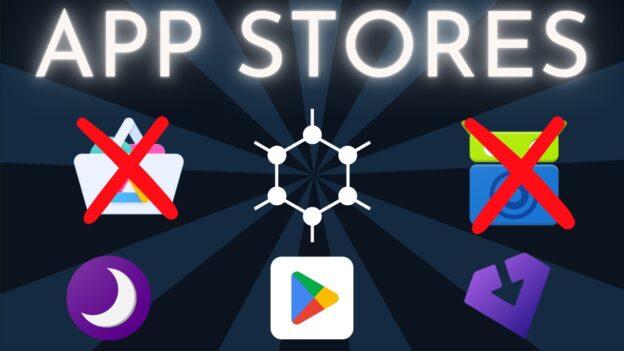
In this video, I walk you through how I install apps on my Google Pixel running GrapheneOS after 3 years of testing and refining my setup. I demonstrate how to use multiple app sources, including the GrapheneOS App Store, Accrescent, Obtainium, and the Google Play Store, while maintaining privacy and security.

If you're new to GrapheneOS, I recommend starting with a simpler setup, like installing the Play Store and getting comfortable, before transitioning to a more advanced configuration. For experienced users, I show how I separate apps across different user profiles to compartmentalize Play Store services and enhance privacy.

//DON'T JUST HOST YOUR PODCAST, OWN IT
🟡 Most platforms host your feed on their domain. If they disappear or terminate your account, your audience disappears too. Yellowball lets you own your feed at your domain—so your show stays yours. Whether you're looking to start a podcast, import an existing one, or just want to learn more, head over to https://yellowball.fm.

//IN THE SHELL PODCAST
In the Shell is a podcast I host that tells stories of hackers, malware, and the people who shaped tech. You can head over to https://intheshellpodcast.com to see the different ways to listen.

//SUPPORT THE CHANNEL:
☕ There's no obligation, but if you want to support the channel and what I create, click the link below to buy me a coffee, so I can stay awake while researching topics for future videos.
https://support.sideofburritos.com

//LINKS REFERENCED IN VIDEO:
https://sideofburritos.com/blog/grapheneos-how-i-install-apps/

//NEWSLETTER SIGNUP:
https://sideofburritos.com/newsletter/

//MOBILE PRIVACY GUIDE
https://sideofburritos.com/docs/setup-guides/mobile-privacy/

// Chapters:
Disclaimer – 00:00
Overview – 00:30
Podcast Announcement – 00:56
User Profiles – 01:18
Installing Orbot – 01:55
How VPNs Work with User Profiles – 02:31
Orbot Exit – 02:51
Orbot Connection Issue Fixes – 03:24
GrapheneOS App Store – 04:06
Accrescent App Store – 04:45
Obtainium – 05:19
Google Play Store Overview – 06:33
How to Create an Anonymous Google Account – 07:03
Compartmentalizing Accounts – 09:03
Critiques About Verifying Phone Number – 09:48
Google Play Store Installing Apps – 10:50
Google Play Store App Not Available Issue Fix – 11:36
Disabling Apps in Owner Profile – 12:09
Use Install Available Apps for Secondary User – 12:38
Switching to Secondary User Profile – 13:43
Checking Apps Installed in Secondary User – 14:06
Google Play Store Services – 14:21
Benefit of Separate Profile for Google Play Store Services – 14:48
Updating Apps on Multiple User Profiles – 15:27
Summary – 15:48

//DISCLAIMER:
This video is for educational purposes only.

#grapheneos #privacy #howto #security

How to install an operating system on your computer

Video

Video Description

This video will clearly take you through the process of installing an operating system to you computer.

Install Windows 11 on ANY Windows 10 PC with NO data loss!

Video

Video Description

Think you're limited to Microsoft's "approval" on installing Windows 11? Think again – you can ABSOLUTELY do it with NO data loss!

💻 FREE computer recommendations: https://forms.gle/6hsvxDGpUFifH4WF8

FlyBy11 download link: https://github.com/builtbybel/Flyby11

Upgrade to Windows 11 Pro from $14 and enhance your PC experience on Keysfan

52% Off Coupon Code for Windows: AYCG52
Windows 11 Pro ($14): https://www.keysfan.com/windows-11-professional-key.html?ksf=aycg1
Windows 11 Pro – 2 keys ($27): https://www.keysfan.com/windows-11-professional-2-keys-pack.html?ksf=aycg1
Windows 10 Pro ($9): https://www.keysfan.com/windows-10-professional.html?ksf=aycg1
Windows 10 Pro – 2 keys ($16): https://www.keysfan.com/windows-10-pro-professional-cd-key-2-pcs.html?ksf=aycg1

62% Off Coupon Code for MS Office: AYCG62
Microsoft Office 2021 Pro ($39): https://www.keysfan.com/microsoft-office-2021-professional-plus-key-1pcs.html?ksf=aycg1
Microsoft Office 2019 Pro ($29): https://www.keysfan.com/mc-office-2019-pro-plus-1pc.html?ksf=aycg1
Windows 11 + Office 2021 ($52): https://www.keysfan.com/windows-11-pro-and-office-2021-pro-plus-key-bundle.html?ksf=aycg1
Windows 10 + Office 2021 ($48): https://www.keysfan.com/windows-10-pro-and-office-2021-pro-plus-key-bundle.html?ksf=aycg1
Keysfan Christmas Sale: https://www.keysfan.com/christmas-sale-aycg.html?ksf=aycg1

#Keysfan#Windows10#Windows11#CheapWindows10#cheapwindows11#Office2021#microsoft

❤️ Support the channel using our affiliate links! ❤️
My TOP 10 Favorite Windows programs of all time – https://youtu.be/-dEB7kIU0TM
MalwareBytes: https://prf.hn/l/q3BJaLB
Every Windows user should do this right now! – https://youtu.be/OWPjOgAjr4o
DriverMax: https://secure.2checkout.com/affiliate.php?ACCOUNT=INNOVAALu0026AFFILIATE=133236u0026PATH=https%3A%2F%2Fwww.drivermax.com%3FAFFILIATE%3D133236
2-week FREE trial: stop Data Brokers from selling YOUR personal data – https://aura.com/askyourcomputerguy

❓ If you need personalized help, here's how you can find me: Please remember that I am just ONE person. It takes a TON of time and money to keep quality content coming to you free of charge. Viewers like YOU supporting the growth of the channel through tips and donations is how I'm able to do that!

I get TONS of questions daily, so here's the best way to get direct answers to your questions, in the order of "easiest to reach" to "may never see your message".

❤️ A Superchat donation on any of my videos is always appreciated and ALWAYS gets my attention
❤️ Purchase anything on my Amazon wish list:
https://www.amazon.com/hz/wishlist/ls/POI6B4LK90RH?ref_=wl_share
☕ Buy Me a Coffee: https://www.buymeacoffee.com/askyourcomputerguy
💻 Standard YouTube comment on a relevant video
💻 E-mail to askyourcomputerguy@gmail.com
💻Twitter DM: https://www.twitter.com/AskMeComputers
💻 Facebook message: https://www.facebook.com/askyourcomputerguy
💻 LinkedIn message: https://www.linkedin.com/in/ask-your-computer-guy-953248217/
💻 Instagram message: https://www.instagram.com/askyourcomputerguy/
💻 Discord server: https://discord.gg/jPwMdc3MVW

😎 Hope you guys enjoy this video! If you did, please like and share it!

🔔 Don't forget to subscribe to this channel for more updates! https://cutt.ly/mOW7myv

⚡️ Here are tools that I *highly* recommend and use personally every day…
Hardware —
◼ 142-piece magnetic electronics precision screwdriver set with 120 bits
👉 https://amzn.to/3exdNeb\\\\\\\\\\\\\\\\\
◼ Sabrent USB-C docking station for SATA and m.2 with offline cloning
👉 https://amzn.to/47iK2aI
◼ StarTech 4-bay USB 3.0 hard drive docking station 6Gbps
👉 https://amzn.to/3z6zNpG
◼ StarTech 2-bay USB 3.0 hard drive docking station SATA 6Gbps
👉 https://amzn.to/3sAGZt0
◼ Netgear A6100 wifi adapter
👉 https://amzn.to/3DWUp5p
◼ Godshark NVME to USB adapter M.2 SSD to Type-A USB 10Gbps
👉 https://amzn.to/3FGw3O8
◼ Cordless, rechargeable air duster 6000mAh 10w fast-charging
👉 https://amzn.to/3pzJWIa

💢 Here is some helpful/useful and FREE everyday software that you might enjoy!
◼ Ninite (used to automatically download and install your favorite software):
👉 http://www.ninite.com
◼ Defraggler (used to defragment and organize your files on hard drives, not for SSD):
👉 http://www.defraggler.com
◼ Open Office (Microsoft Office FREE replacement)
👉 http://www.openoffice.org

💢 Hey, do you want even MORE in-depth techie stuff? Check out my friend Nico's page, Nico Knows Tech. Tell him I sent you and watch the obscenities fly LOL
✔ https://www.youtube.com/nicoknowstech

⚠️ Affiliate link notice ⚠️
Some links included in this video are affiliate links. The creator may make a small percentage from any products that you purchase through one of these links. This purchase comes at ZERO extra cost to you, and greatly helps to support the growth of this channel.

Thanks so much for stopping in and watching!

Get Paid to Install Apps – Up to $100+ Per App! (5 REAL & Free Ways)

Video

Video Description

Are you looking for ways to get paid to install apps? This video will show you 5 legit and realistic ways to make money online by downloading apps.
✔️Links to options mentioned in this video:👇
Freecash: https://paidfromsurveys.com/freecash-review
Pawns App: https://paidfromsurveys.com/pawns-review
PrizeRebel: https://paidfromsurveys.com/prizerebel-review
Swagbucks: https://paidfromsurveys.com/swagbucks-review
appKarma: https://paidfromsurveys.com/appkarma-review

I have tested hundreds of ways to make money online. Many viewers have asked me if there are ways to make money by downloading apps. And there are actually legit platforms where you can earn like this.

However, not all are actually worth your time.

Therefore, I decided to record this video to show you the 5 best ways to get paid to download apps.

All options I mentioned in this video are 100% free to join and can be a great way to earn some extra cash on the side.

You just have to do it with the right expectations and be aware that this will not make you rich. But if you find the right offers, there are some apps where you can earn up to $100 once you complete the offer.

So you need to make sure you read the exact conditions before downloading the app so you’ll know what to expect and get paid for your effort.

If you want to learn more about the platforms mentioned in this video, you can find more information through the links at the top of this video description. 👆

0:00 Intro to the best ways to get paid to install apps
0:29 What to expect
3:54 Ways to get paid to install apps – Option 1
6:24 Option 2
7:27 Option 3
8:47 Option 4
10:14 Option 5
11:14 Final thoughts

================================
Subscribe:
👉https://www.youtube.com/paidfromsurveys?sub_confirmation=1

================================

Learn the Best Way to Build a Full-Time Income Online: https://paidfromsurveys.com/buildonlinebusiness

Get the Ultimate Guide to Make Money Online with Free Methods – the email course is 100% FREE:
👉https://paidfromsurveys.com/free-money-methods-course

================================

Share this video: https://youtu.be/LdnFXU27hUI

================================

The information on this YouTube channel and the resources available are for educational and informational purposes only. Do not see it as financial advice.

================================

Affiliate Disclaimer: While I receive affiliate compensation for some reviews/promotions on this page, I always offer honest opinions, relevant experiences, and genuine views related to the product or service itself. My goal is to help you make the best decisions, however, the views and opinions expressed are mine only. As always you should do your own due diligence to verify any claims, results, and statistics before making any kind of decision. Clicking links recommended on this page may generate income for this website/channel from affiliate commissions.
================================

NEVER install these programs on your PC… EVER!!!

Video

Video Description

We have talked about what software every PC should have… but today we are going to talk about what software you should NEVER install… EVER!

Get an iFixit kit for yourself or someone you love at – https://amzn.to/3IDDkj9
Get your JayzTwoCents Merch Here! – https://www.jayztwocents.com

○○○○○○ Items featured in this video available at Amazon ○○○○○○

► Amazon US – http://bit.ly/1meybOF
► Amazon UK – http://amzn.to/Zx813L
► Amazon Canada – http://amzn.to/1tl6vc6

••• Follow me on your favorite Social Media! •••
Facebook: http://www.facebook.com/jayztwocents
Twitter: http://www.twitter.com/jayztwocents
Instagram: http://instagram.com/jayztwocents#
SUBSCRIBE! http://bit.ly/sub2JayzTwoCents

($50 Per Game) 🤑 Get Paid To Install & Play Games | Free PayPal Money

Video

https://www.youtube.com/watch?v=uow17Be-LrQ

Video Description

In this – make money online. We will try to cover how to make money online and earn $50 per game you install and play. And the good thing is that with these play to earn games apps you can earn free paypal money, and get paid in @paypal

🤑 mPaisa Link 👉 https://play.google.com/store/apps/details?id=com.gspl.mpaisau0026referrer=cashpro

So in this play to earn games app, we will discover how to earn money online with the mPaisa play to earn games app. And we also try to cover – mpaisa app, m paisa, mpaisa app unlimited coin trick, m paisa app unlimited trick, mpaisa coin trick, so that we can make money online with it. This is completely new earning app today, and you can earn free paypal money with it, which is a great business idea to consider.

And you can do it as a work from home jobs, remote jobs, or as a remote work to start to make money online. And here you can make money online with free traffic. It is a smart money tactics that you can use to make money income online to earn smart money, and financial freedom.

Today, I am going to reveal the best how to make money online tutorial for your guys. Which you can do as a side hustle as work from home. You can earn money online for completely free with the business ideas I will share on how to make money or how to earn money online.

Is it really possible? Yes, and in “CashPro” YouTube channel, I share smart money tactics that work for everyone to make money online, build passive income, or even create a sustainable online business.

▬▬▬▬▬▬▬▬▬▬▬▬▬▬▬▬▬▬▬▬▬▬
💥 Tap The Like Button u0026 Subscribe For More! 💰
▬▬▬▬▬▬▬▬▬▬▬▬▬▬▬▬▬▬▬▬▬▬

🔥Related Videos:

✅ Get Paid $2.48 Every Min Watching YouTube Videos (🤑 NEW Website) | How To Make Money Online
➤➤ https://youtu.be/Q52JDxMAnUE

✅ Get Paid $2.49 Every Min 🤑 Watching Google Ads
➤➤ https://youtu.be/b1UYfLlg4YQ

✅ Earn $2.00 💵 Every 5 SEC Watching YouTube Videos ▶️ – How To Make Money Online
➤➤ https://youtu.be/kDoUT6jgUKE

✅ Get Paid $1.80 EVERY Min 🤑 Watching Google ADs – Make Money Online
➤➤ https://youtu.be/0bc-_va4PAU

✅ $100+/Day 🤑 3 Legit PASSIVE INCOME Apps – Make Money Online
➤➤ https://youtu.be/bwa10yVNrxw

✅ (PROOFS INSIDE) 🤑 Get Paid $20 Every 10 Min Installing APPs
➤➤ https://youtu.be/QN_tfBzTdGo

✅ Get Paid $990+ Watching YouTube Videos – Make Money Online
➤➤ https://youtu.be/Ei1EvwJ-ntw

▬▬▬▬▬▬▬▬▬▬▬▬▬▬▬▬
On CashPro, we go through ways to make money online, make money watching videos, and work from home. So stay tuned for the latest easy ways to make money, online jobs, and earn money by watching video ads. CashPro is the BEST finance and making money online channel on YouTube!

#p2e #playtoearn #play2earn #play
#makemoneyonline #makemoneyonline2024 #howtomakemoneyonline #howtomakemoneyonline2024 #earnmoneyonline2024 #earnmoneyonline #onlineearning #earningapp #workfromhome #howtoearnmoneyonline #workfromhomejobs2024 #workfromhomejobs #paypalmoney #paypal #makemoneywithai #aimoney #makemoneyonlinepaypal #playtoearn #remotejobs #remotework #freepaypalmoney
▬▬▬▬▬▬▬▬▬▬▬▬▬▬▬▬

FAIR USE DISCLAIMER: All materials in these videos are TRANSFORMATIVE and are used for educational purposes and fall within the guidelines of fair use. No copyright infringement intended. If you are or represent the copyright owner of materials used in this video and have a problem with the use of said material, please send me an email, VIDEOMASTER78901@GMAIL.COM.

▬▬▬▬▬▬▬▬▬▬▬
AFFILIATE DISCLOSURE: This video and description may contain affiliate links, which means that if you click on one of the product links, I’ll receive a small commission. I won't put anything here that I haven't verified and/or personally used myself.
▬▬▬▬▬▬▬▬▬▬▬
EARNINGS DISCLAIMER: This video is for educational purposes only. Any earnings or income representations are aspirational statements only of your earning potential. There is no guarantee that you’ll receive the same results or any results at all for that matter. Your results will depend entirely on your work ethic, experience, etc. You expressly agree not to rely upon any information contained in this video.